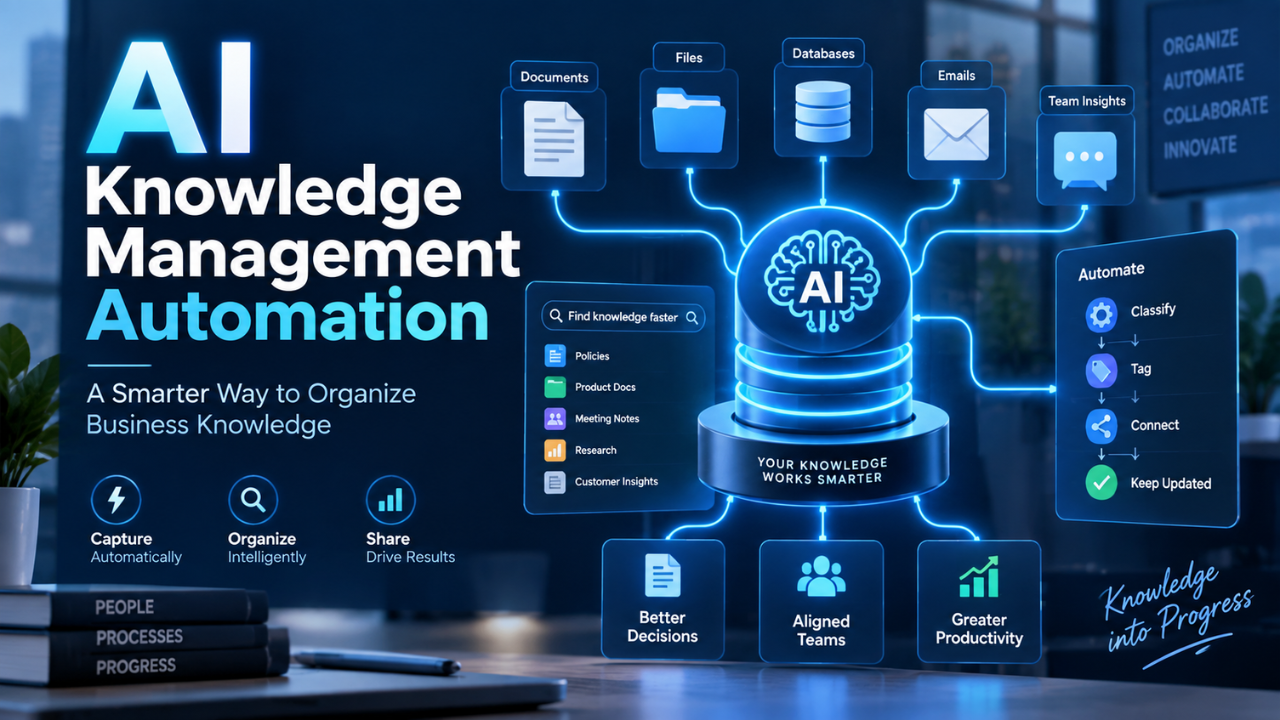
AI Knowledge Management Automation: A Smarter Way to Organize Business Knowledge
Most companies don’t really have a shortage of knowledge. They have a shortage of ways to find and use it.
Useful information sits everywhere: shared drives, email threads, meeting notes, project management tools, internal wikis, support tickets, and the heads of experienced employees. Someone usually knows the answer. The frustrating part is figuring out who that person is, or where they saved the document six months ago.
AI knowledge management automation changes that situation by making business knowledge easier to collect, organize, update, and retrieve without requiring employees to manually maintain every piece of information.
Done well, it can turn a messy collection of files and conversations into something employees can actually use. Instead of hunting through folders for twenty minutes, someone can find the right policy, procedure, project detail, or customer answer in seconds.
Table of Contents
- What AI Knowledge Management Automation Actually Means
- Why Traditional Knowledge Management Becomes Messy
- How Knowledge Management Automation Works
- Where Automation Makes the Biggest Difference
- Search Becomes More Useful
- Keeping Knowledge Current Without Constant Manual Work
- What Businesses Should Automate First
- The Human Side Still Matters
- Common Problems to Watch For
- Building a Practical Knowledge Automation Strategy
- The Real Value Is Faster Access to Useful Knowledge
What AI Knowledge Management Automation Actually Means
Knowledge management is simply the process of capturing what an organization knows and making that knowledge available to the people who need it.
Automation takes away much of the repetitive work involved.
Instead of asking employees to manually categorize every document, for example, a system can identify the topic, extract useful information, apply tags, connect related resources, and place the content where it belongs.
It can also help employees retrieve information through natural questions rather than forcing them to remember exactly where something was stored.
Imagine a new customer support employee asking:
“What’s our refund policy for annual subscriptions?”
Traditionally, they might search the company wiki, open three outdated documents, message a manager, and eventually find the answer.
With a properly organized automated knowledge system, that same question can lead directly to the current policy and its original source.
That sounds like a small improvement. Across hundreds of employees and thousands of questions, it isn’t small at all.
Why Traditional Knowledge Management Becomes Messy
Knowledge bases usually start with good intentions.
A company creates folders, documentation standards, naming conventions, and maybe an internal wiki. Everything looks organized during the first few months.
Then the business grows.
New projects appear. Employees create their own folders. Teams adopt different software. Documents get copied instead of updated. Someone saves “Pricing Policy Final.docx,” followed by “Pricing Policy Final V2.docx” and eventually the legendary “Pricing Policy FINAL FINAL UPDATED.docx.”
We’ve all seen some version of it.
The bigger problem isn’t messy filenames. It’s trust.
Once employees stop trusting the knowledge base, they stop using it. They start asking colleagues directly because that feels faster than searching through questionable information.
That creates another problem. Experienced employees spend part of their day repeatedly answering questions they’ve already answered before.
Automation can help break that cycle by continuously organizing information rather than waiting for someone to clean everything manually.
How Knowledge Management Automation Works
The exact setup depends on the company, but the basic idea is fairly straightforward.
Information comes from different business systems. That could include internal documents, customer support platforms, project tools, company policies, training materials, emails, or approved communication channels.
The system analyzes that material and identifies useful relationships.
A customer onboarding document, for example, might be connected with onboarding checklists, training videos, account setup instructions, and frequently asked support questions.
Instead of treating those resources as isolated files, the knowledge system begins treating them as related pieces of information.
Automation can also handle routine tasks such as categorization, duplicate detection, summarization, tagging, content routing, and identifying potentially outdated documents.
The goal isn’t simply to store more information.
It’s to reduce the work required to turn raw information into usable knowledge.
Where Automation Makes the Biggest Difference
Some knowledge management tasks benefit much more from automation than others.
Document organization is an obvious one.
Companies generate enormous numbers of files, and expecting employees to correctly label and categorize everything isn’t realistic. Automated classification can make those documents easier to discover without creating another administrative task.
Customer service is another strong example.
Support teams answer many variations of the same questions every day. When previous solutions, product documentation, policies, and troubleshooting instructions are connected properly, agents can find answers much faster.
Employee onboarding also benefits.
Think about someone’s first week at a new company. They may need information about payroll, software access, security policies, vacation requests, reporting structures, internal tools, and dozens of other things.
Instead of asking five different people, employees can search one knowledge environment.
That doesn’t eliminate human guidance. It simply removes many unnecessary interruptions.
Search Becomes More Useful
Traditional workplace search can be surprisingly unforgiving.
You often need to know the exact terminology used in the document you’re trying to find.
Suppose the finance team created a document called “Travel Reimbursement Guidelines,” but an employee searches for “how do I claim hotel expenses?”
A basic keyword search may struggle because the wording isn’t identical.
Modern knowledge systems can understand more of the meaning behind the search. The employee doesn’t need to know the official document title. They can describe what they’re trying to accomplish.
This changes how people interact with internal information.
Search stops feeling like guessing keywords and starts feeling more like asking a knowledgeable colleague.
There is one important condition, though: the underlying information still needs to be reliable. Better search can’t magically fix a knowledge base filled with conflicting policies.
Keeping Knowledge Current Without Constant Manual Work
Outdated knowledge is often worse than missing knowledge.
At least when information is missing, employees know they need to ask someone.
Outdated documentation can quietly lead them in the wrong direction.
Imagine an employee finding a two-year-old process for setting up a customer account. The instructions look professional and detailed, but half the software screens have changed.
Knowledge automation can help identify content that hasn’t been reviewed recently, detect multiple versions of similar documents, and flag information that may conflict with newer material.
Teams can then focus their attention where it actually matters.
Rather than manually reviewing thousands of pages every few months, they can review the smaller group of documents that appear outdated, duplicated, or inconsistent.
That’s a much more realistic approach.
What Businesses Should Automate First
Trying to automate everything at once is usually a mistake.
Start with repetitive knowledge tasks that already create obvious frustration.
For one company, that might be employees constantly asking HR the same policy questions. For another, it could be support agents searching through hundreds of troubleshooting documents.
Look for situations where people frequently say things like:
“I know we documented this somewhere.”
“Which version is current?”
“Who knows how this works?”
“Didn’t we solve this problem before?”
Those are useful signals.
Once a specific problem has been identified, the organization can connect the relevant information sources, improve the content quality, and automate the repetitive parts of managing that knowledge.
Small wins matter here. A system that reliably solves one painful information problem is more valuable than an ambitious platform employees don’t trust.
The Human Side Still Matters
Automation doesn’t remove the need for people who understand the business.
Someone still needs to decide which policies are correct, which information should be accessible, and which knowledge deserves to become an official company resource.
Context matters too.
A sales conversation from three years ago might contain useful insight, but that doesn’t automatically make every statement inside it current company policy.
Human review is especially important for sensitive areas such as legal guidance, security procedures, financial information, and employee policies.
There’s also knowledge that doesn’t fit neatly into documents.
Experienced employees often know small practical details that have never been formally written down. Capturing that knowledge requires conversations, interviews, retrospectives, and good workplace habits.
Technology can organize knowledge.
People still create much of the knowledge worth organizing.
Common Problems to Watch For
The biggest mistake is assuming that adding automation automatically creates good knowledge management.
It doesn’t.
If the source information is inaccurate, duplicated, badly written, or outdated, automation may simply make bad information easier to find.
Permissions deserve serious attention as well.
A company knowledge system might contain salary information, internal financial data, customer records, contracts, product plans, and private employee information. Not everyone should be able to access everything.
Access controls need to remain part of the architecture from the beginning.
Another issue is source visibility.
Employees should be able to see where important information came from, particularly when making business decisions. A useful knowledge system shouldn’t behave like a mysterious box that produces answers without evidence.
Trust grows when users can open the original policy, document, or approved source and verify the information themselves.
Building a Practical Knowledge Automation Strategy
The best starting point isn’t technology. It’s a business problem.
Choose one knowledge-heavy workflow and understand how information currently moves through it.
Maybe customer support agents spend ten minutes searching for technical answers. Maybe engineers constantly ask senior developers about old infrastructure decisions. Perhaps HR receives the same twenty questions every week.
Map that process first.
Then identify the reliable sources of knowledge behind it.
Clean up obviously outdated material, establish ownership for important documents, and decide who should have access to what.
Only then does automation become truly useful.
Once the initial workflow works well, expand gradually.
A support knowledge base might eventually connect with product documentation. Product documentation might connect with engineering decisions. Employee onboarding materials might connect with HR policies and internal training.
Over time, separate knowledge collections begin behaving more like one connected organizational memory.
That is where things become interesting.
The Real Value Is Faster Access to Useful Knowledge
The real promise of AI knowledge management automation isn’t creating an enormous digital library.
Most companies already have enormous digital libraries.
The value comes from reducing the distance between a question and a trustworthy answer.
When employees can quickly find previous decisions, current policies, project context, technical instructions, and organizational expertise, they spend less time searching and more time actually working.
The strongest systems won’t eliminate conversations between colleagues, nor should they. People will still ask questions, share experience, and solve unfamiliar problems together.
But fewer conversations need to begin with, “Does anyone know where that document is?”
That alone can make knowledge management feel dramatically different.