AI Lead Generation Automation: A Practical Guide to Better Prospects
Introduction
Most businesses don’t have a lead shortage. They have an attention shortage.
Inquiries arrive through landing pages, chat, email, social media, webinars, and contact forms. Someone must sort them, identify serious interest, reply usefully, and decide who should follow up. When that work is manual, good prospects can disappear into a crowded inbox.
AI lead generation automation gives this first layer a consistent system. It captures interest, organizes information, spots buying signals, personalizes an initial response, and alerts the right person when a conversation deserves human attention. The goal isn’t to replace salespeople or send more random messages. It’s to help a team focus on better conversations.
A clever tool won’t rescue a confusing offer or weak process. But when the basics are sound, automation makes lead handling faster and easier to measure.
Table of Contents
- Introduction
- What AI Lead Generation Automation Actually Does
- Why Businesses Are Adopting It
- How the Workflow Works
- Useful Lead-Scoring Signals
- Personalization Without Sounding Fake
- Where Human Judgment Still Matters
- How to Implement It Without Creating a Mess
- Common Mistakes to Avoid
- Metrics That Actually Matter
- Frequently Asked Questions
- Final Thoughts
What AI Lead Generation Automation Actually Does
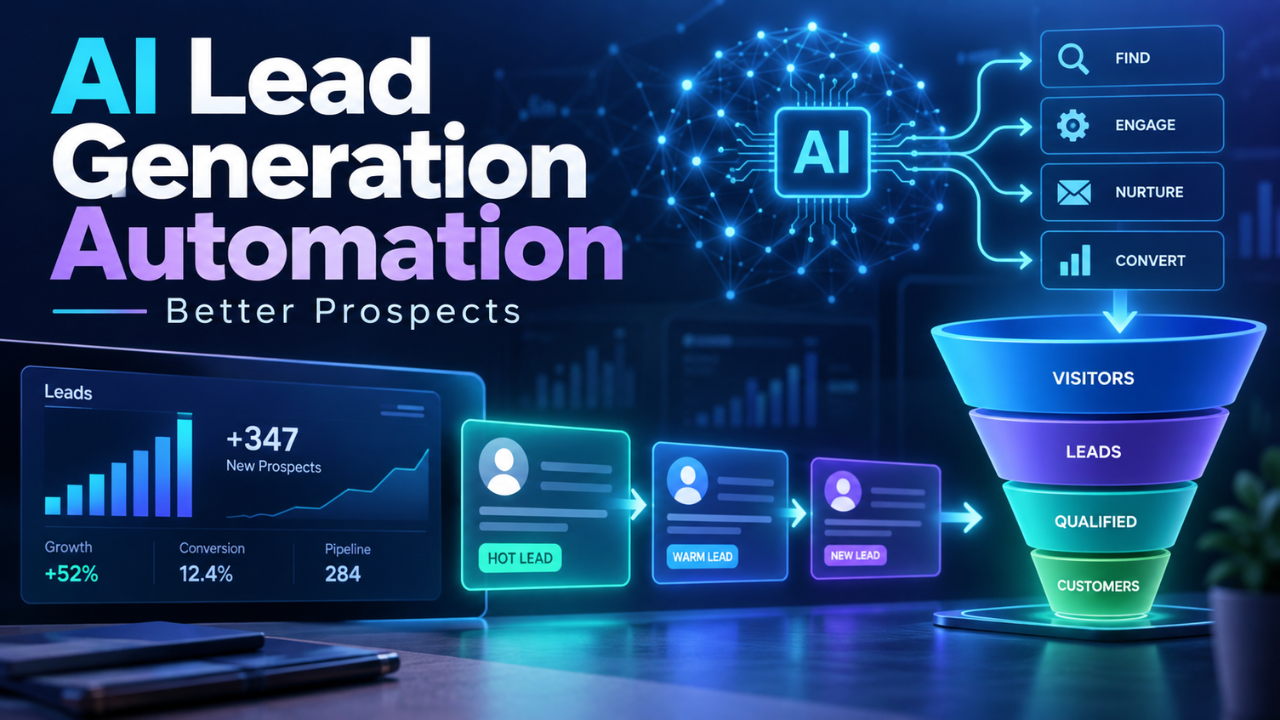
At its simplest, the system connects first interest to a sales conversation. A visitor submits a form, replies to an email, downloads a guide, books a call, or asks a question in chat. Automation gathers those signals and turns them into an organized record.
Traditional automation follows fixed instructions: if someone submits this form, send that email. AI-assisted automation can handle less tidy information. It can summarize an inquiry, identify the problem, distinguish research from buying intent, and suggest a next action.
A good setup combines simple rules with flexible interpretation. Rules protect boundaries, while AI helps the team understand language and context. Salespeople then see what the prospect asked, what they may need, and why the inquiry deserves attention.
Why Businesses Are Adopting It
Lead generation has become a timing problem as much as a volume problem. A company may attract plenty of visitors but lose opportunities because replies are slow, follow-ups are inconsistent, or every inquiry gets the same treatment.
Imagine a software company receiving 40 demo requests each week. Ten are excellent fits, fifteen need education, and the rest are outside the service area. Without sorting, every request feels equally urgent. Automation can route the best-fit inquiries to a representative, place researchers in a helpful sequence, and record obvious mismatches without consuming selling time.
It also improves consistency. The system doesn’t forget a follow-up because Monday became busy. It can remind a salesperson when a warm prospect goes quiet or flag renewed activity after several weeks.
How the Workflow Works
The strongest workflows are easy to explain. A typical journey looks like this:
| Stage | What automation handles | What the team should check |
|---|---|---|
| Capture | Collects forms, chats, replies, and campaign responses | Whether the source and consent data are reliable |
| Understand | Summarizes the inquiry and extracts needs, industry, size, or timing | Whether the summary reflects the prospect accurately |
| Qualify | Compares the information with the ideal customer profile | Whether the score matches real sales outcomes |
| Nurture | Sends relevant information and follow-up reminders | Whether the message is genuinely useful |
| Route | Assigns or alerts the right person | Whether ownership and response times are clear |
The process should feel connected, not like separate tools passing incomplete records around. If a prospect repeats the same information in three forms, the automation is creating friction rather than removing it.
Useful Lead-Scoring Signals
Lead scoring is not a magic number. It helps only when it reflects why real buyers move forward.
Useful signals include the problem in a message, company size, location, budget, timeline, pricing-page activity, repeat visits, or attendance at a demonstration. One signal rarely tells the whole story. A person may visit a pricing page by accident, while another shows strong intent through a detailed question.
Negative signals matter too. A request for an unsupported service or a location outside the market should lower priority. Start with a small scoring model and compare it with real conversations. If researchers keep being labeled as hot leads, adjust it. The goal is a useful queue, not a perfect number.
Personalization Without Sounding Fake
Personalized follow-up works when it proves that the business understood the prospect. It fails when it only inserts a first name into a generic message.
A better reply refers to the stated challenge, explains the next step, and offers one clear choice: “You mentioned that invoice approvals slow down at month-end. Would you prefer a workflow example or a call about your current process?” That is more useful than a vague promise to transform the business.
Keep the first response modest. Answer a pricing question before pushing a meeting. If the inquiry is unclear, ask one helpful question. The tone can adapt to the customer without becoming overly familiar.
Where Human Judgment Still Matters
Automation is excellent at sorting, summarizing, reminding, and preparing. It is less dependable when a situation is sensitive, commercially complex, or unusual.
A salesperson should review large opportunities, complaints, partnerships, regulated services, and unusual requirements. Human review also matters when a score affects access, pricing, or another important decision.
Treat the system as a first reader, not the final authority. People should be able to disagree, correct the record, and explain what happened. Those corrections connect the process to real outcomes instead of assumptions.
How to Implement It Without Creating a Mess
Start with one narrow problem: faster replies, better routing, or fewer high-intent inquiries getting lost.
Map the current journey before choosing features. Note where leads enter, what details are collected, who reviews them, and where delays occur. This often exposes missing fields or unclear ownership that software cannot fix.
Define response rules. Which inquiries need an alert? Which can enter a nurture sequence? When should messaging stop and a person take over? What information must never be guessed?
Test low-risk examples. Read the summaries, check the scores, and review every message for accuracy and tone. Let a salesperson approve the workflow before it handles serious volume. Set a regular review because products, markets, and signals change.
Common Mistakes to Avoid
The first mistake is optimizing for lead count instead of quality. A full database can look impressive while producing little revenue.
Long forms create another problem. They reduce completion and collect details nobody uses. Ask for what the next step requires.
Fast but irrelevant replies also feel careless. A low score should not make a reasonable inquiry impossible to reach; give salespeople a way to review exceptions.
Finally, don’t ignore data quality. Duplicate records, missing source details, outdated contacts, and unclear permission can make the workflow unreliable. Clean inputs are where dependable automation begins.
Metrics That Actually Matter
Track measures that connect activity to useful conversations. Lead count is only the beginning.
Watch time to first meaningful response, the percentage meeting qualification criteria, qualified leads becoming meetings, and qualified pipeline created. Review how often salespeople reject recommendations. A high rejection rate usually points to weak scoring or poor data.
Measure time saved too. If the team spends less time copying information and more time speaking with suitable prospects, the workflow is creating value. Ask which summaries were accurate, which alerts arrived late, and which follow-ups felt awkward. These comments can reveal what a dashboard misses.
Frequently Asked Questions
Does AI lead generation automation replace salespeople?
No. It handles repetitive sorting, summarizing, and follow-up so salespeople can focus on conversations that need judgment and trust.
Is it only useful for large companies?
No. A small team may benefit even more because one person often handles marketing, sales, and support. A simple workflow prevents good inquiries from being forgotten.
What information does the system need?
It needs reliable basics: the inquiry, contact details, source, relevant business information, and clear qualification criteria. More data isn’t automatically better.
How quickly should a company implement it?
Begin with one workflow and test it for a few weeks. Expanding a clear process is safer than automating every channel at once.
Can it generate leads without paid advertising?
It can improve leads from referrals, email, social content, events, and existing customer activity. It doesn’t replace a useful offer or a reason to respond.
How can businesses avoid spammy follow-up?
Use permission-based communication, keep messages relevant, limit frequency, make opting out easy, and stop messages when a person asks for different contact.
Final Thoughts
AI lead generation automation works best as a quiet layer behind a thoughtful sales process. It catches details, reduces delay, and helps people decide where attention belongs.
The strongest setup is rarely the most complicated. Start with a real bottleneck, use signals the sales team understands, keep people involved in important decisions, and measure the quality of conversations that follow. When automation makes the customer experience clearer instead of noisier, it earns its place in the pipeline.