Lunatask Review: Is It Worth Using?
A to-do list can remember everything and still leave you wondering what to do next. Add a habit tracker, a notebook, and a calendar, and getting organized starts to feel like another job.
Lunatask tries to bring those scattered pieces together. Its appeal goes beyond checking boxes: it gives your tasks some structure while leaving room for routines and reflection.
That makes it an interesting choice for personal planning. But having more features doesn’t automatically make an app easier to live with. The real question is whether its approach fits the way you manage an ordinary, slightly messy day.
Table of Contents
- What Lunatask Helps You Manage
- A Task List That Gives You Direction
- Making Room for Work on Your Calendar
- Habit Tracking Without Another App
- Journaling That Adds Context to Your Day
- How Private Is Lunatask?
- Desktop and Mobile Availability
- Lunatask Pricing and Free Plan Limits
- Where the App Gets in Your Way
- Is Lunatask Worth Using?
What Lunatask Helps You Manage
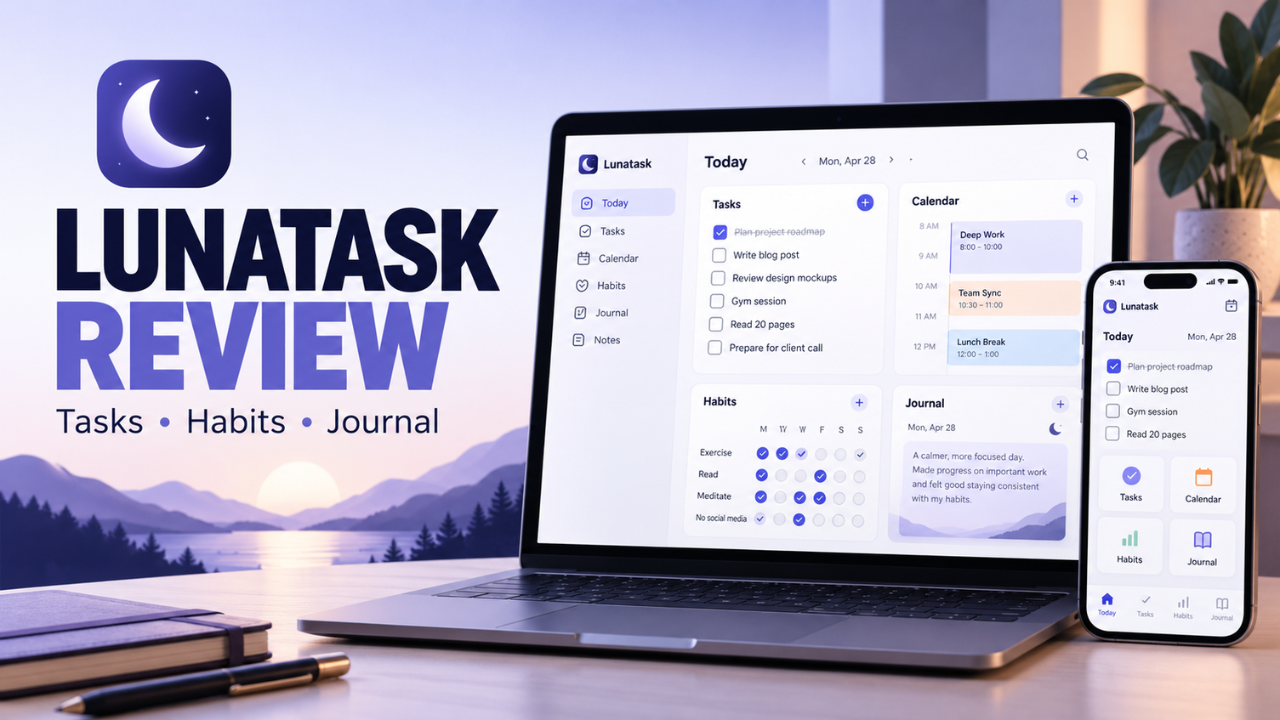
Lunatask combines tasks, habits, notes, journaling, mood tracking, and relationship tracking. It’s built around managing your own life, with several tools sharing the same space.
Tasks sit inside “areas of life,” such as Work and Personal. Within each area, goals can organize projects or longer ambitions. A freelancer could keep a website launch under Work while saving household jobs under Personal. You don’t need an elaborate structure to begin.
The smaller features broaden its usefulness. Notes and notebooks can hold reference material, while relationship tracking lets you record details about people and set reminders to reconnect. Remembering to call an old friend belongs in a personal planning system just as much as remembering an invoice.
Still, you’ll get more value from this approach if you actually want several of those tools.
A Task List That Gives You Direction
Lunatask’s Now/Later workflow separates your current focus from things that can wait. “Now” doesn’t have to mean everything you promised yourself you’d finish today. It means the work that currently deserves your attention. Automatic ordering considers details including priority and how long tasks have been waiting.
Imagine having twelve jobs on your list, with only three that need attention before lunch. Keeping the other nine outside your immediate focus makes the list easier to act on.
You can also choose other workflows, including Kanban and date-based planning. Premium adds Must/Should/Want and the Eisenhower Matrix. That flexibility is helpful, although experimenting with every method could become its own distraction.
There’s also an optional work-in-progress limit that warns when you take on too much active work. I like that emphasis on finishing: starting a fifth task rarely helps when the first four are still open.
Making Room for Work on Your Calendar
Time blocking lets you give tasks and habits a place in your day. On desktop, you can drag tasks onto the calendar rather than leaving them floating in a list.
Suppose a client call starts at eleven. You could reserve forty minutes beforehand to prepare, then leave a small gap instead of squeezing another large job into the remaining time. Seeing the space available can expose an unrealistic plan quickly.
Premium calendar integrations bring events from services such as Google Calendar, Outlook, and iCloud into Lunatask. However, those connections currently work in one direction: external events come in, rather than Lunatask sending changes back out.
That distinction matters if you want your planned work blocks visible elsewhere. Treat the calendar as a daily planning view, and check the sync behavior before making it central to your routine.
Habit Tracking Without Another App
Habit tracking makes sense alongside daily tasks because routines compete for the same time. Reading for twenty minutes still needs room somewhere, even if it never feels urgent.
Lunatask supports habits tracked by day, with custom schedules, and Premium weekly habits measured across a whole week. The latter works well for goals like going for three walks whenever you have free time. Suitable habits also display streaks, while repeated activities can be counted multiple times within a period.
Choose the format around the behavior. A flexible weekly target can be more useful than demanding a perfect daily record.
I’d begin with two habits. A crowded tracker can quickly become another list you avoid opening.
Journaling That Adds Context to Your Day
A completed task tells you what happened. A short journal entry can explain why the day felt easy, frustrating, or strangely unproductive.
Lunatask provides daily journaling alongside mood tracking. You can customize journal prompts rather than stare at a blank page. One limitation is that mood, energy, and stress each have a single value per day, shared across that day’s entries.
For a simple evening check-in, that may be enough. If you want to record every shift throughout the afternoon, it’s restrictive.
Keep the habit brief: what distracted you, what worked, and what you’d change tomorrow. Those observations can make next week’s plans more realistic.
How Private Is Lunatask?
Privacy deserves attention when an app holds personal reflections alongside work details.
According to Lunatask’s documentation, content such as tasks, notes, and journal entries is encrypted before syncing to its cloud, and the company doesn’t hold the private key needed to read it. Some metadata, including task status, priority, and assigned dates, remains unencrypted. That means you shouldn’t interpret its privacy claims as covering every piece of information identically.
There’s a practical responsibility here too. If you lose your master password, Lunatask says it cannot recover the encrypted content; resetting the account loses existing data. Keep that password somewhere dependable.
For someone keeping a personal journal, the protection is a meaningful reason to consider the app. It still pays to understand what’s protected and how account recovery works.
Desktop and Mobile Availability
Lunatask has apps for Windows, macOS, Linux, iOS, and Android. It currently has no web app, which could be a deciding factor if your workplace prevents software installation.
Also, availability across devices doesn’t mean every feature works identically. For example, habit groups aren’t currently available in the mobile app.
Try your actual routine on the devices you use most. Capture a task on your phone, review it at your desk, and check how calendar access fits your setup. That’s more revealing than judging the app from a desktop screenshot.
Lunatask Pricing and Free Plan Limits
The published prices below were checked in October 2026.
| Plan | Price | Key details |
|---|---|---|
| Free | $0 | Two areas of life, seven daily habits, and 30 relationships |
| Premium monthly | $8 per month | Unlimited areas, habits, and relationships, plus premium features |
| Premium annual | $72 per year | Equivalent to $6 per month, paid annually |
| Lifetime Premium | $300 once | Purchase through Windows, Linux, or the Mac DMG app |
The free plan includes notes, journaling, mood tracking, timers, and time blocking. Premium adds external calendar integrations, weekly habits, energy and stress tracking, note templates, and additional prioritization methods. Lifetime purchasing isn’t available through the mobile apps or Mac App Store version.
For personal planning, the free limits leave enough room to find out whether the basic approach works for you. Paying makes more sense when you can identify a specific missing feature you’ll use regularly.
Where the App Gets in Your Way
The main tradeoff is how much you need to learn. Areas, goals, workflows, and scheduling each serve a purpose, but together they ask for more thought than a basic checklist.
Collaboration is another boundary. Lunatask doesn’t currently provide shared task lists and delegation in the way a team planning tool would. If several people need to manage the same work, that limitation matters.
Integrations can bring tasks into Lunatask, but don’t assume they provide ongoing outward task sync.
Export also needs a careful look. The desktop app offers data export, but its documentation acknowledges that the current format doesn’t include every entity and property. Test a sample export before moving years of information into it.
These are worth weighing against the convenience of keeping several personal tools together.
Is Lunatask Worth Using?
Lunatask makes the strongest case for people who want to connect daily work with habits and reflection. Its task workflows offer more direction than a plain checklist, while the journal gives personal planning some useful context.
I’d start small: one work area, one personal area, a few real tasks, and a couple of habits. Give that setup an ordinary week before adding more structure.
Keep using it if choosing the next task becomes easier and maintaining the system takes less effort. That’s the result that matters. A planning app earns its place through the work it helps you finish and the attention it frees for everything else.